






How to delete old online accounts and shrink your digital footprint in 2026 — find forgotten logins, delete (not deactivate), and opt out of data brokers.
Every account you have ever created still exists somewhere — and each one is another door into your digital life. According to the U.S. Cybersecurity and Infrastructure Security Agency (CISA), your activity across devices and apps generates data that can reveal your “interests, associations, and pattern of life.” Data brokers compile that data into profiles that “can be bought and sold by virtually anyone,” and threat actors use those profiles to build targeted campaigns such as spear-phishing. This guide shows you how to delete old online accounts — find the ones you forgot, delete them the right way (delete, don’t just deactivate), and shrink your digital footprint for good.
What Is a Digital Footprint — and Why Dormant Accounts Matter
Your digital footprint is the sum of the traces you leave behind: the accounts you open, the permissions you grant, and the data services collect about you. CISA notes that even a location history can expose your schedule, your routine, the people you associate with, and your home or workplace, while an app’s usage pattern can hint at private facts.
Security professionals frame the risk with a simple idea. NIST’s glossary defines an attack surface as the set of points where an adversary can try to enter or extract data from a system. Every forgotten account is one more of those points.
That is why dormant accounts are not harmless clutter. According to security vendor Bitdefender, every account you create extends your footprint, and accounts you no longer use are a common risk because they keep personal data on file that can leak if that service is later breached — Bitdefender points to the 2012 Zappos breach as an example of account data being exposed. (This is a vendor/security-company view, not an official standard.)
The compounding problem is re-used credentials. If a dormant account shares a password with an active one, a single leak can cascade — see our guide on how to check if your password was leaked. Closing the accounts you no longer use removes those weak points before an attacker finds them.

Step 1: Build Your Account Inventory from Your Inbox
You cannot delete what you cannot find, so start by listing every service that knows you exist. Your inbox is the fastest place to look. Bitdefender recommends searching your mailbox for sign-up and lifecycle terms — words like “welcome,” “verify,” “confirm,” and “unsubscribe,” plus the names of services you remember using.
- Open your email search and run each term one at a time: welcome, verify, confirm, unsubscribe.
- Search for common service names you recall (shops, forums, apps, newsletters).
- Log each result in a simple two-column list: service name, and the email address it is tied to.
- Repeat the search in any secondary inboxes or alias addresses you use.
By the end you will have a rough map of your footprint — often more accounts than you expected.
Step 2: Cross-Check Your Password Manager
A password manager is a ready-made inventory of everything you have saved a login for. Bitdefender recommends cross-checking your manager’s saved-login list against your inbox list to catch accounts that never sent a memorable email (or whose emails you already deleted).
- Open your password manager and export or review the saved-login list.
- Add any service that appears there but not on your inbox list.
- Flag duplicates — the same service under multiple emails — and decide which to keep.
- Mark every entry you genuinely still use, so the remainder becomes your deletion shortlist.
No password manager yet? That itself is a footprint problem worth solving first: a manager both centralizes your logins and makes the next account sweep far easier.
Step 3: Find Forgotten Accounts with JustDeleteMe and Data-Broker Search
Two tools close the gaps your inbox and vault miss.
JustDeleteMe is an open-source, community-maintained directory of services that links directly to each one’s deletion page and rates how hard deletion is (from easy to “impossible”), grouped by category. It is built and updated on GitHub and offers browser extensions, making it a strong single starting page for a deletion spree.
Data-broker and people-search lookups catch the accounts that never had a login you control — profiles built from public records and purchases. CISA recommends requesting data-broker opt-outs and data removal, noting that some organizations “may be legally obligated to honor your request based on the laws of the country or state.” California publishes an official list of registered brokers in its Data Broker Registry, which is a useful starting point for finding the companies that hold data on you.
Note: exact opt-out menu paths differ per broker, so treat each broker’s own privacy or opt-out page as the source of truth rather than a one-size-fits-all set of steps.
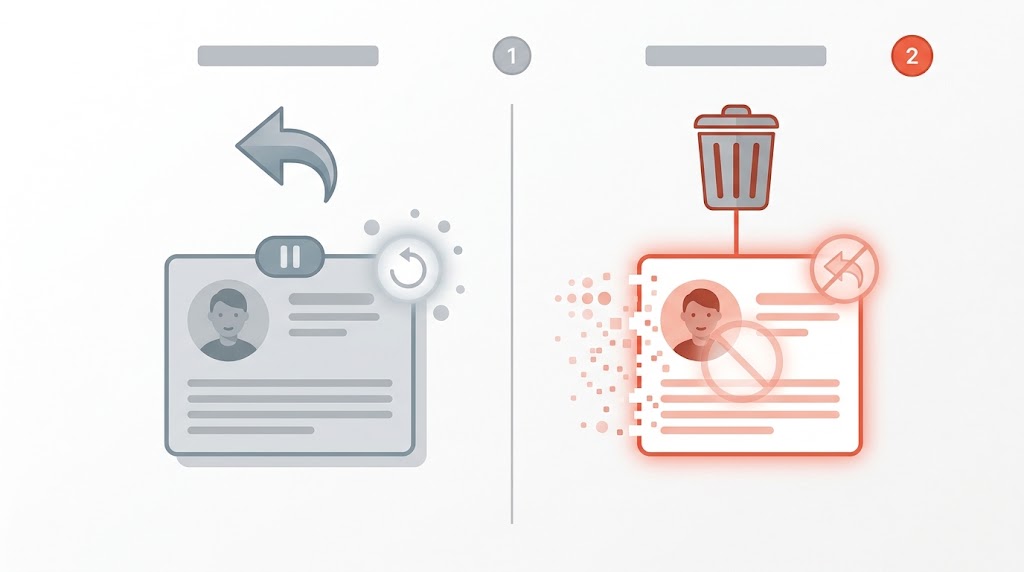
Delete, Don’t Deactivate: Why the Difference Matters
This is the most common mistake in footprint cleanup. “Deactivate” and “delete” are not the same thing, and only one of them actually reduces your attack surface.
| Deactivate | Delete | |
|---|---|---|
| Reversible? | Yes — usually a restore window | No — cannot be undone |
| Your data | Retained by the service | Account/profile removed |
| Your posts | Stay visible | May still stay visible |
| Your username | Usually still yours | May become unavailable |
| Best for | Taking a break | Reducing your attack surface |
Two official examples show how different the outcomes are:
- X (formerly Twitter) distinguishes deactivation from permanent deletion. Per X’s help center, deactivation starts a 30-day window during which the account can be restored; if you do not reactivate, it becomes permanently deleted after about 30 days.
- Reddit is the opposite: deletion cannot be reactivated, your username becomes unavailable, and you lose access to your account and its history. Reddit’s help page (updated February 26, 2026) warns that “Deleting your account doesn’t delete any posts or comments you’ve made” — you must remove those separately first. It also notes a paid subscription is not cancelled by deleting the account, that deletion is confirmed with your password, and that Reddit then runs a deletion process commencing within 90 days to remove or anonymize the account from its servers. Admins cannot delete an account on your behalf.
In short: deactivate when you want a pause, delete when you want the account gone — and remember that your content can outlive the account itself.
How to Delete Old Online Accounts: Platform Walkthroughs
Google, X, and Reddit publish clear deletion paths. Facebook, Instagram, and TikTok also let you delete, but their help pages change often, so the steps below stay at the level of the account/settings area and must be confirmed in the app.
- Google Account: Google’s help center explains that deleting your account removes the products and data tied to it — for example Gmail messages, files, calendars, photos, and subscriptions linked to that account. Because that loss is irreversible, export anything you need first.
- X: open the account settings area and choose the option to deactivate, then understand the 30-day restore window before the account is permanently deleted.
- Reddit: follow the account-deletion steps in Reddit’s help center; remember to remove the posts and comments you want gone beforehand, confirm with your password, and expect the process to take up to 90 days.
- Facebook, Instagram, and TikTok: in each app, go to Settings → Account → Deactivate/Delete and follow the prompts to permanently delete. Menus change frequently — confirm the exact wording in-app before you rely on it.
Before You Delete: A Four-Point Checklist
Deletion is irreversible, so run this checklist before you pull the trigger on any account.
- Export what you need. Check each service for an export or data-download option and save the files somewhere you control.
- Remove posted content first. As Reddit makes clear, deleting the account leaves your posts and comments behind — clear them first if you want them gone.
- Cancel paid subscriptions. Deleting the account may not cancel billing (Reddit explicitly says it will not). Cancel the subscription separately.
- Save the credentials elsewhere. If the account holds anything you may need later, note it in your password manager before you lose access.
Step 4: Handle Companies That Make Deletion Hard (GDPR / CCPA right to erasure)
Some services bury deletion or ignore requests. In those cases, use the law.
In the EU and UK, the GDPR’s Article 17 — the “right to erasure,” also called the “right to be forgotten” — gives you the right to have personal data erased without undue delay, subject to the conditions in Article 17(1) and a set of exemptions in Article 17(3), such as freedom of expression, legal obligations, public-health needs, archiving and research, and legal claims. The UK regulator, the ICO, stresses that the right is not absolute: a controller can refuse where an exemption applies, and it generally applies when the data is no longer needed, when you withdraw consent, when you object, or when the processing was unlawful. The ICO adds that controllers generally must respond within one month, and that back-ups complicate erasure — and it flags that its guidance is under review following the UK’s Data (Use and Access) Act.
In California, the CCPA (as amended by the CPRA) grants a Right to Delete, but that right is subject to exceptions. Do not treat US deletion rights as an automatic, nationwide right to erasure: the strong legal lever is the EU/UK route, while California’s right is real but narrower.
One reason to bother: accounts you abandon — and the email addresses attached to them — feed the spear-phishing and account-takeover attempts covered in our guide on how to spot a phishing email. Shrinking your footprint removes the raw material.
Step 5: Opt Out of Data Brokers
Data brokers are the part of your footprint you never signed up for, and California has built a one-stop tool to fight them. The CPPA’s DROP — the Delete Request and Opt-out Platform — lets a single request be sent to 600+ registered data brokers.
Its rollout has a specific timeline, and it is the fastest-changing fact in this guide, so re-check the official page before you plan around it:
- January 1, 2026 — DROP launches.
- August 1, 2026 — data brokers begin processing requests submitted through DROP.
- November 2026 — all registered brokers must delete submitted data every 45 days.
- Status updates may take up to 90 days. DROP is free, for California residents, with sign-in via the California Identity Gateway / Login.gov.
To find out which brokers hold your data, the CPPA’s Data Broker Registry lists registered brokers. If you are outside California, go to individual brokers’ privacy or opt-out pages directly — and expect to repeat the request over time.

Prevent Future Footprint Buildup (quarterly sweep + aliases)
Cleanup is not a one-time event. The habits below keep your footprint from growing back.
- Use email aliases. Give each new service a unique alias address so your real inbox stays clean and a future leak points to exactly one sign-up.
- Grant the minimum. CISA recommends disabling your device’s advertising ID, denying apps permissions they do not need, and vetting apps before installing.
- Tighten browser settings. CISA also points to browser privacy settings as a footprint control.
- Run a quarterly account audit. Every three months, repeat the inbox search, review your password manager, and delete anything you have not used.
- Keep the wider network secure. For the rest of your personal-security setup, see our guide on how to secure your home Wi-Fi network and router.
Frequently Asked Questions
Is deactivating an account the same as deleting it?
No. Deactivation is usually reversible and keeps your data on file, while deletion removes the account. X’s 30-day restore window is a clear example of reversible deactivation; Reddit’s deletion cannot be reactivated.
Will deleting my account remove my old posts?
Not always. Reddit states plainly that deleting your account does not delete the posts and comments you made — remove those first.
Is the right to erasure automatic?
No. GDPR Article 17 is subject to conditions and exemptions, and the ICO notes it is not absolute; the CCPA’s Right to Delete is likewise subject to exceptions. There is no automatic, nationwide US right to erasure.
How long does deletion take?
It varies by service. Reddit begins a deletion process within 90 days, and DROP status updates may take up to 90 days.
Do data brokers really remove my data?
Removal is a process, not a one-time event. CISA says removal may be possible and that some organizations may be legally obligated to honor your request, but you should expect to re-check and repeat opt-outs over time.
The Bottom Line
Every dormant account is an entry point, and every broker profile is a dossier you did not ask for. Find the accounts you forgot, delete the ones you no longer need (delete — do not just deactivate), use your legal rights where a company drags its feet, and opt out of brokers through tools like DROP. Then keep it clean with a quarterly audit.
Your next action: open your email, search “welcome,” and start your account list today.
Sources
- CISA — Limit Your Digital Footprint: https://www.cisa.gov/resources-tools/training/limit-your-digital-footprint
- Reddit Help — How do I delete my account? (updated Feb 26, 2026): https://support.reddithelp.com/hc/en-us/articles/204579509-How-do-I-delete-my-account
- X Help — Deactivating your account (30-day restore window): https://help.x.com/en/managing-your-account/how-to-deactivate-x-account
- JustDeleteMe (deletion directory): https://justdeleteme.xyz/
- GDPR Article 17 — Right to erasure (gdpr-info.eu mirror): https://gdpr-info.eu/art-17-gdpr/
- CPPA — DROP (Delete Request and Opt-out Platform): https://privacy.ca.gov/drop/
- NIST CSRC — “attack surface” glossary term: https://csrc.nist.gov/glossary/term/attack_surface
- ICO — Right to erasure (UK): https://ico.org.uk/for-organisations/uk-gdpr-guidance-and-resources/individual-rights/individual-rights/right-to-erasure/
- Google — Delete your Google Account: https://support.google.com/accounts/answer/32046
- Bitdefender (vendor) — Why you should delete old accounts you no longer use: https://www.bitdefender.com/en-gb/blog/hotforsecurity/why-you-should-delete-old-accounts-you-no-longer-use
- CPPA — Rights under the CCPA: https://privacy.ca.gov/california-privacy-rights/rights-under-the-california-consumer-privacy-act/
Related Guides
