





A backup is only useful if it survives the very disaster that makes you need it. That is the whole idea behind the 3-2-1 rule: keep more than one copy, store them in more than one way, and put one of them somewhere the bad thing cannot reach. This guide explains the 3-2-1 rule in […]
A backup is only useful if it survives the very disaster that makes you need it. That is the whole idea behind the 3-2-1 rule: keep more than one copy, store them in more than one way, and put one of them somewhere the bad thing cannot reach. This guide explains the 3-2-1 rule in plain English, walks through the backup types and tools that make it work, and covers the step almost everyone skips — testing that your backup can actually be restored.
What Is the 3-2-1 Backup Rule?
The 3-2-1 rule is a simple, widely recommended framework for keeping data safe. According to the U.S. Cybersecurity and Infrastructure Security Agency (CISA), a backup is a secure copy of your data kept separately from the original, so it survives if the original is corrupted, deleted, or encrypted. The 3-2-1 rule states that you should keep:
- 3 copies of the data — the original plus two backups;
- on 2 different media types — for example, an internal drive and an external drive, so one failure mode does not take out both;
- with 1 copy stored off-site — somewhere physically separate, such as a cloud service or a drive kept at another location.
Why “three copies” doesn’t mean three hard drives
The count matters less than the spread. If all three copies sit on the same desk, plugged into the same machine, a single theft, fire, flood, or ransomware infection can take out all three at once. The rule works because it forces you to separate copies by medium and by location, not just by file name.

Why the 3-2-1 Rule Still Matters in 2026
Backup used to be about hardware failure — a drive clicking its last click. Today the bigger threat is deliberate: ransomware that encrypts your files and then hunts for your backups.
This is the key reason the “1” (off-site) and an offline copy matter so much. As CISA’s #StopRansomware Guide explains, ransomware deletes or encrypts backups that are merely accessible on the network. A backup the attacker can reach is not a backup — it is another victim. You need at least one copy that an infection cannot touch.
The scale of the problem is significant. According to the Verizon 2025 Data Breach Investigations Report (DBIR), as cited by CISA, ransomware was involved in roughly 44% of breaches. That is a 2025 report figure rather than a 2026 one, so treat it as a recent baseline, not a current-year measurement.
There is also a nastier variant to know about: double extortion. CISA defines it as attackers who both steal your data and encrypt it — so even a perfect restore does not undo the theft. Good backups limit the damage, but they are not a substitute for preventing the break-in in the first place.
Backup Types Explained: Full, Incremental, and Immutable Copies
Not every backup is the same kind of thing, and mixing types is how you build coverage without wasting space.
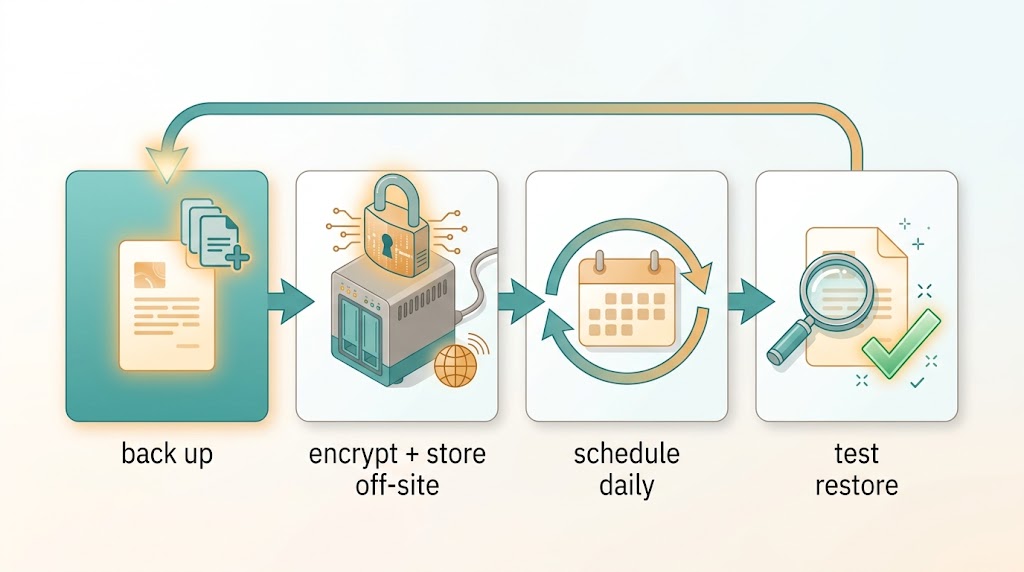
Full and incremental backups
A full backup copies everything. An incremental backup copies only what changed since the last backup of any kind, while a differential backup copies everything that changed since the last full backup. Most consumer and small-business tools handle this automatically: you take one full backup, then fast, small top-ups on a schedule. The practical result is the same — you always have a recent, restorable snapshot.
Offline, immutable, and versioned copies
These are the features that specifically defeat ransomware, and CISA’s guidance names them directly. Offline (or isolated) means the copy is not reachable from the network at the moment of attack. Immutable storage and object lock mean the backup cannot be altered or deleted for a set period, even by an administrator. Version control keeps multiple historical versions so you can roll back to a clean point. A golden image is a known-good snapshot of a system you can rebuild from.
Local Backup Options
Local copies are fast to restore and give you direct control. Two common approaches:
External drives
A USB or portable drive is the simplest local backup: plug it in, copy your important folders, and disconnect it. That last step is the important one — a drive that stays connected is reachable by ransomware. An external drive is a good fit for the “2” (local copies) part of the rule when you have more than one medium.
NAS devices
A network-attached storage (NAS) box is a small drive that lives on your home or office network and can hold scheduled backups from several devices. It is convenient because backups run on their own. The trade-off is that a NAS is on the network, so it is not automatically an offline copy — check whether your device offers snapshot or immutable features, and keep a separate offline or off-site copy regardless.
Cloud Backup Options (and Why “Sync” Isn’t Backup)
A cloud service satisfies the “1 off-site” requirement. Because it is off-site and (in a proper backup configuration) versioned, it can survive theft, fire, and a local ransomware infection that has not yet locked your cloud account.
The catch is the single most common misunderstanding in personal backup: sync is not backup. A sync service mirrors your files to the cloud so they appear on all your devices. That is wonderful for convenience and terrible for recovery. If ransomware encrypts your laptop, sync dutifully copies the encrypted files over your clean cloud copies, and you have lost your backup without ever realising you did not have one.
When choosing a cloud option, look for features that behave like a backup rather than a mirror: version history you can roll back, retention that keeps older copies, and ideally immutable or “locked” versions. Exact features, storage limits, and prices differ by provider and change often — check each provider’s official page for current details before you commit.
Building a Backup Routine You’ll Actually Keep
The best backup plan is the one that still exists in six months. Two ideas make that easier.

Set an RPO and an RTO — in plain words
CISA recommends defining two targets. RPO (Recovery Point Objective) is how much data loss you can tolerate — if your RPO is one day, you need a backup that runs at least daily. RTO (Recovery Time Objective) is how fast you must be back up and running after a failure. Deciding these two numbers tells you how often to back up and how fast your restore method needs to be. A blogger might accept a day of lost drafts; a small business running orders cannot.
Retain enough history and encrypt it
CISA advises keeping at least seven days of roll-back so you can recover to a point before an incident, and keeping an offline copy of critical files that can be accessed without the network. It also recommends encrypting your backups — important if you are storing them off-site or on a drive you carry around. Deciding what to back up matters too: think of the data types CISA lists, such as financial and payroll records, customer or client records, HR records, email, configuration files, and databases.
Testing Restores: The Step Everyone Skips
A backup you have never restored from is a hope, not a plan. CISA’s cross-sector guidance (referred to as CPG 2.R) calls for maintaining offline, encrypted backups of critical data and testing their availability and integrity as part of a disaster-recovery scenario. In plain terms: periodically restore a file or folder from each copy and confirm it opens and is complete.
Do this at least a few times a year, and always after changing your backup setup. Testing is also how you find out whether your “backup” is really a sync mirror in disguise.
Common Backup Mistakes to Avoid
- Keeping the only backup connected to the network. This is the mistake ransomware is designed to exploit.
- Treating sync as backup. If deletion or encryption propagates to the cloud, you have no separate copy.
- Never testing a restore. Untested backups fail exactly when you need them.
- Keeping all copies in one place. Three copies on one desk are still one fire away from zero.
- No version history. Without roll-back, an infection that syncs over your good copy leaves nothing to recover to.
FAQ
What does the 3-2-1 backup rule stand for?
Three copies of your data (the original plus two backups), on two different media types, with one copy stored off-site — as defined by CISA.
Is cloud storage a backup?
Only if it keeps versioned, recoverable copies rather than simply mirroring your files. A pure sync service is not a backup, because it copies corruption and deletions too.
How often should I back up my data?
As often as your RPO demands — the amount of data loss you can tolerate. Daily suits most people; adjust to how quickly your important files change.
Do I really need an offline copy?
Yes. CISA notes ransomware deletes or encrypts backups that are merely accessible on the network, so at least one copy must be out of reach of an infection.
Final Thoughts
The 3-2-1 rule is not complicated, and that is the point: three copies, two media, one off-site, with at least one copy offline and encrypted, and a restore test you actually perform. Start by deciding how much data loss you can live with, add an offline copy this week, and run your first restore test this month. For the security habits that keep attackers out in the first place, see our related guides below.
Sources
- CISA — Back Up Business Data: cisa.gov — Back Up Business Data
- CISA — #StopRansomware Guide: cisa.gov — #StopRansomware Guide
Related Guides on Dhanutech
- How to check if your password was leaked — account compromise is a common first step before a ransomware attack.
- How to spot a phishing email — many ransomware infections arrive as a malicious attachment or link.
- How to secure your home Wi-Fi network and router — a protected network helps keep a local backup drive out of reach.